


Logitech Swytch BYOD Flexible Room Solution
You May Also Like

Features
SWYTCH
Connect a laptop to a room system's AV equipment for use with any video meeting or webinar.

ANY MEETING, EVERY ROOM
With an innovative design that maximises compatibility and incorporates DisplayLink® Plug-and-Display technology, Logitech Swytch offers a one-cable laptop link to a room's conference camera and display, making it easy for teams to meet, present, and stream over any service.
THE FLEXIBLE ROOM SOLUTION
With Swytch, you can deploy video conferencing room solutions from providers like Microsoft® or Zoom®, while also allowing people to use meeting rooms with other video services.

SAY YES TO EASY
To join or host a video meeting, simply plug the iconic Swytch Connector into any laptop with a USB 3.0 or higher Type A or Type C port. No dongles, no splitters, no HDMI required.

SIMPLE SETUP
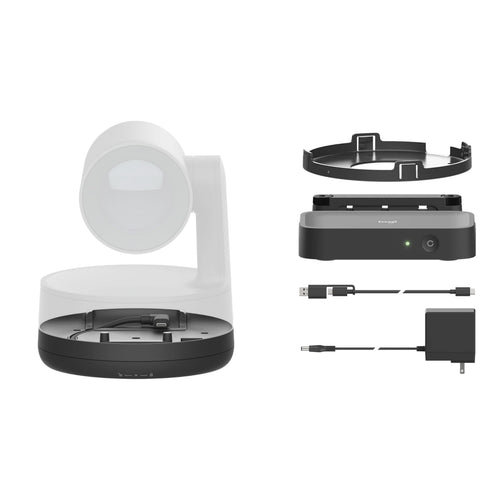
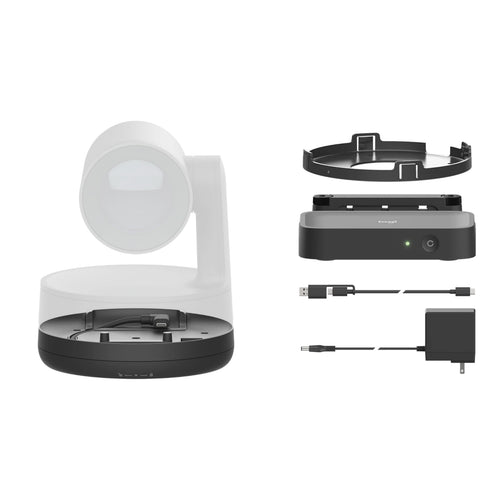
It's easy to deploy Swytch in rooms that use USB-connected conference cameras, video bars, or modular cameras. Simply connect the Swytch Hub to the meeting room equipment, place the Swytch Connector within easy reach and use your video conferencing service of choice.
USB CONFERENCE CAMERAS - SWYTCH + MEETUP
In rooms using USB cameras such as MeetUp, simply connect the Swytch Hub to the camera and place the Swytch Connector within reach.

ALL-IN-ONE VIDEO BARS - SWYTCH + RALLY BAR
In rooms using video bars such as Rally Bar or Rally Bar Mini, run the Swytch Hub into the video bar and place the Swytch Connector within reach of participants.

MODULAR CONFERENCE CAMERAS - SWYTCH + RALLY PLUS
In large rooms using modular video conferencing systems such as Rally Plus, connect Swytch to your conference camera using the Swytch Extender.

EVERYTHING IN ITS PLACE
Swytch integrates beautifully with your meeting rooms. Keep the tabletop clean and organised with the included magnetic dock, or route the Swytch Connector through an existing cable well. Either way, robust cable retention keeps connections tight.
Magnetic Dock

Cable Retention

Cable Well-Ready

TURNS LAPTOPS INTO ROOM SOLUTIONS
Thanks to hidden cabling and a convenient magnetic dock, Swytch keeps every room tidy and organised, even those without dedicated computers. A single connection and straightforward user experience make it easy for anyone to use their personal laptop for team collaboration.

ADDITIONAL FEATURES
POWER DELIVERY
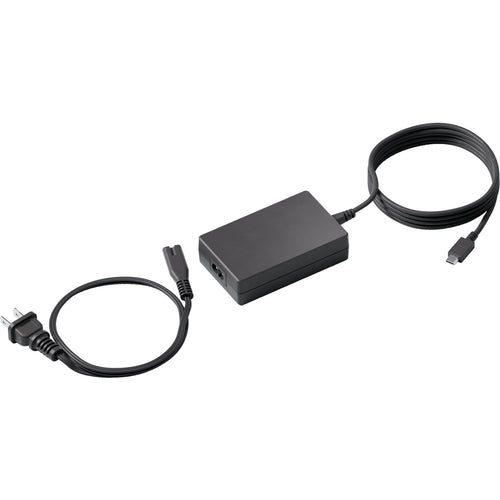
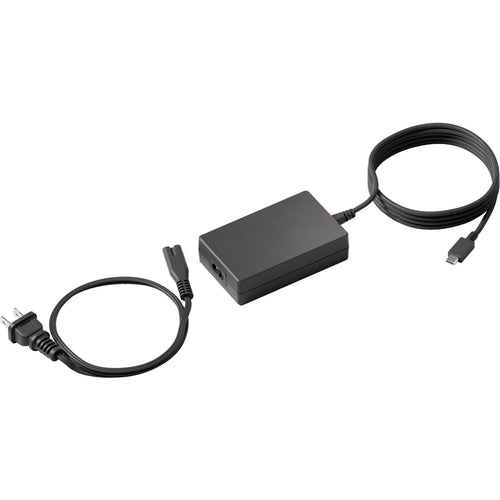
Never run out of power when hosting a video meeting: Swytch provides 60 watts of power to laptops that charge via USB-C.
PLUG-AND-DISPLAY
Thanks to DisplayLink Plug-and-Display technology, a single connection is all you need for both USB devices and an HDMI display.
FULL MOTION VIDEO + AUDIO
Play full-motion video and audio from a laptop on the room's display and speakers, or into online meetings.*
* Works with video conferencing services that support content sharing with audio
WORKS WITH MOST LAPTOPS
Featuring both USB Type A and Type C connectors, Swytch works with Chromebooks and Windows® and Mac laptops with USB 3.0.
REMOTE MANAGEMENT
Monitor and manage Swytch, MeetUp, Rally, and other meeting room devices with Logitech Sync.
DEPLOYMENT RESOURCES
From wiring diagrams to quick reference cards, a range of deployment resources simplify installation and make it easy to introduce Swytch to end users.
Specifications
Technical Specifications
| Swytch Hub | Height: 27.4 mmWidth: 164 mmDepth: 90 mm |
|---|---|
| Swytch Extender | Height: 27.4 mmWidth: 120 mmDepth: 120 mm |
| Meeting Room Equipment | Display with HDMI inputUSB conference cameras with speakerphone |
| Laptop Computers | USB 3.0 Port (Type A or Type C)USB Power Delivery (Up to 60 watts) for compatible laptops that charge via USB Type COperating Systems with DisplayLink Plug and Display™ Drivers, including Windows 10, macOS 10.15 and later, and ChromeOS™ 75 or later. |
| Swytch Hub | PowerHDMI 2.0 to DisplayHDMI 2.0 to Meeting Room ComputerUSB 3.0 Type A to Conference CameraUSB 3.0 Type C to Meeting Room ComputerUSB 3.0 Type C to Swytch Extender |
| Swytch Extender | PowerUSB 3.0 Type A to Swytch HubUSB 3.0 Type C to Swytch ConnectorUSB 3.0 Micro B to Swytch Connector |
| Swytch Connector | USB 3.0 Type A to laptops with Type A portsUSB 3.0 Type C to laptops with Type C ports |
| Mounts | Swytch Hub: Compatible with Logitech PC Mount (not included)Swytch Extender: Mount through a 25 mm grommet hole or attach below the table with included hardwareSwytch Connector: Magnetic dock included |
| General Specifications | Number of Meeting Room Displays: 1Maximum Resolution and Frame Rate, Display: 4K/60 fpsMaximum Resolution and Frame Rate, Camera: 4K/30 fpsLaptop Audio for Local Sharing: YesLaptop Audio for Online Meetings: Yes (with services that support content sharing with system audio)Device Management: Remote monitoring and management via Logitech Sync |
| Compatibility | Conference Cameras- Works with Logitech Rally and Rally Plus, Rally Bar, Rally Bar Mini, MeetUp, GROUP, and other conference cameras that connect via USBRoom Solutions- Microsoft Teams Rooms- Zoom Rooms- Also compatible with other room solutions that use USB-connected conference cameras and an HDMI-connected display.Cabling- Logitech Strong USB 10m- Logitech Strong USB 25m |
| PACKAGE CONTENTS | Swytch HubSwytch Extender100-240v Swytch Hub Power Supply100-240v Swytch Extender Power Supply5m / 16.4ft USB 3.0 Cable2.2m / 7.2ft USB 3.0 Cable2.0m / 6.5ft HDMI 2.0 CableMounting accessoriesDocumentation |
| Brand | Logitech |
|---|---|
| Product Type | UC & Video Conferencing > Video Conferencing |
| Weight | 1.156 kg |
| Warranty |
|---|
Note:
Warranty period is as stated above unless the manufacturer has chosen to specify a longer period.
All warranties are return to base unless otherwise specified.
Shipping Information
- Free NZ-wide shipping on orders over $299
- Standard delivery 2–5 business days
- Rural delivery may take an additional 1–2 days
- Same-day dispatch for orders placed before 2pm (weekdays)
Returns Policy
- 7-day returns on unused items in original packaging
- Faulty or damaged products covered under warranty
- Contact our support team to initiate a return