


Acer Altos BrainSphere P10 F10 RTX 5070 Creator Studio Workstation
You May Also Like


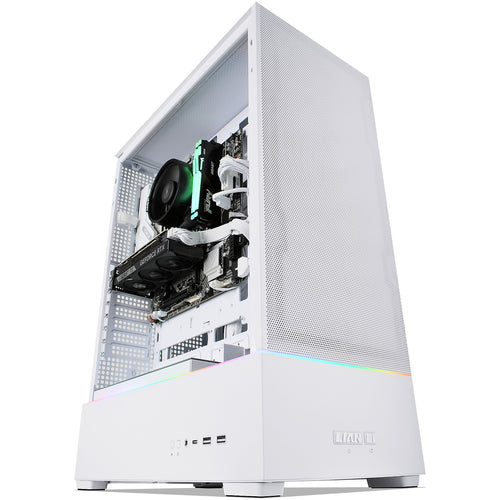
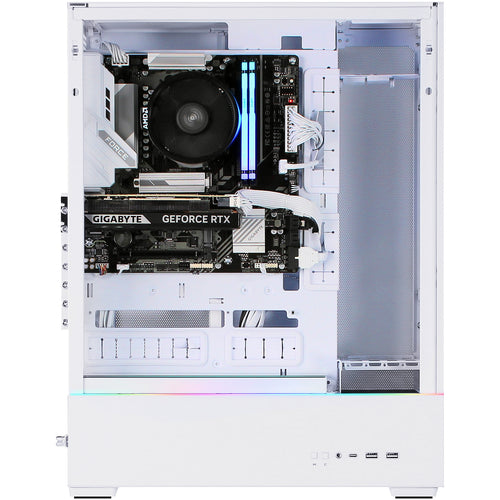
Features
Altos BrainSphere™ P10 F10
Altos P10 F10 equipped with Intel® Core™ Ultra series 2 processor and support DDR5 memory. Supports PCIe Gen 4 expansion slots and PCIe Gen 4 M.2 NVMe SSD which makes high processing performance and data storage speed. Ideal for users seeking a budget-friendly, easy-to-use entry-level option that offers great value for everyday needs.
High-Performance Processor
Equipped with an Intel® Core™ Ultra series 2 processor, delivering excellent computing performance to meet daily business needs.
Fast Memory and Storage
- Comes with DDR5 RAM, ensuring smooth multitasking.
- Built-in PCIe M.2 SSD, providing fast data read/write speeds, quick system boot-up, and rapid application loading.
Stable and Reliable Design
Uses 100% solid capacitors, enhancing system stability and longevity, making it ideal for long-term business operations.
Versatile Connectivity
- Features up to 9 USB ports, including two USB 3.2 Gen 2 10Gbps ports for high-speed data transfer.
- Supports up to three display outputs, allowing for efficient multi-screen workflows.
Enhanced Security and Management
Integrated Trusted Platform Module (TPM) 2.0 for hard-ware-level encryption, ensuring data security.

Frequently asked questions
Can I swap out parts and/or add/change/remove operating systems in a KW Tech PC?
We can add any part to a PC for a small fee as long as we don't need to remove an existing part for it to fit, for example adding more RAM, an extra hard drive, installing a Windows OS, or adding a graphics card to a PC without one (we can even SLI/Crossfire for you if it is compatible). We cannot change components that are part of an existing build e.g. Upgrade an existing graphics card or add a SSD with Windows installed if the PC only has a single hard drive (as the OS is already pre-installed). If you do have a specific requirement, then one of our experienced sales team will be happy to build a system that suits your needs.
Contact our WebSales team here
What parts are used in this PC?
The parts are subject to change depending on stock availability but the specifications listed in the title will always be correct. If you have specific parts you are after, one of our experienced sales team will be happy to build a system that suits your needs.
Once again, you can contact our WebSales team here
I've just purchased my first custom PC, how do I set it up?
Our short new PC setup guide shows you how to safely unbox it, and set it all up so you can get to work or start playing games.
Specifications
Technical Specifications
| Processors | Intel Core™ Ultra 7 265 processor (LGA1851) |
|---|---|
| Number of Processor | 1 |
| Memory | 32GB Installed4 DIMM slots (Dual channel)Up to 192GB |
| Storage | 1TB SSD |
| I/O Expansion | 1 PCI-E 5.0 x16 slot1 PCI-E 4.0 x16 slot (wired as x4)2 PCI-E 3.0 x1 slot2 M.2 2280 PCI-E 4.0 slots (NVMe SSD)1 M.2 2230 PCI-E 3.0, E Key (Wi-Fi & Bluetooth) |
| Management Network Interface (Controller) | 1 Gb/s BASE-T LAN Port (Intel® I219V) |
| OS | Microsoft® Windows 11 Pro 64-bitUEFI Shell |
| Dimension | 335 (D) x 175 (W) x 370 (H) mm (13.19 x 6.89 x 14.57 inches) |
| Brand | Acer |
|---|---|
| Product Type | Computers & Tablets > Computer Systems |
| Weight | 10.43 kg |
| Warranty |
|---|
Note:
Warranty period is as stated above unless the manufacturer has chosen to specify a longer period.
All warranties are return to base unless otherwise specified.
Shipping Information
- Free NZ-wide shipping on orders over $299
- Standard delivery 2–5 business days
- Rural delivery may take an additional 1–2 days
- Same-day dispatch for orders placed before 2pm (weekdays)
Returns Policy
- 7-day returns on unused items in original packaging
- Faulty or damaged products covered under warranty
- Contact our support team to initiate a return