Dell Pro USB-C Hub Conference P3426WEB
Features
Next generation collaboration experience
See every detail, even in low light
The Sony Starvis 5MP sensor ensures professional-grade video clarity, while the QHD camera with HDR delivers balanced exposure, so you always look your best during virtual meetings.

Spotlight's on you
AI Auto Framing keeps you center-framed even as you move and shift, so the focus is always on you.

Effortless collaboration with secure access
Seamless platform compatibility
Certified for Microsoft Teams and Zoom, this monitor ensures reliable performance for all your virtual meetings. Plus, launch Teams meetings instantly with the quick-access touch control.
Built-in privacy and security
With Windows Hello sign-in and a mechanical tilt and shutter, stay in control of your privacy while enjoying secure, password-free access for a seamless and worry-free collaboration experience.

Hear the difference
Experience crystal-clear voice quality with dual beamforming AI noise cancellation technology that filters out background noise, ensuring your voice is heard with precision during every call.
Complementing this, two 5W downfiring speakers provide clear sound for meetings and presentations.

Connectivity meets productivity
Connect your accessories with a wide variety of ports, all in a clutter-free setup.
Single-cable solution
Transmit video, data, Ethernet, and up to 90W power delivery all at once with USB-C.

Pop-out quick access ports
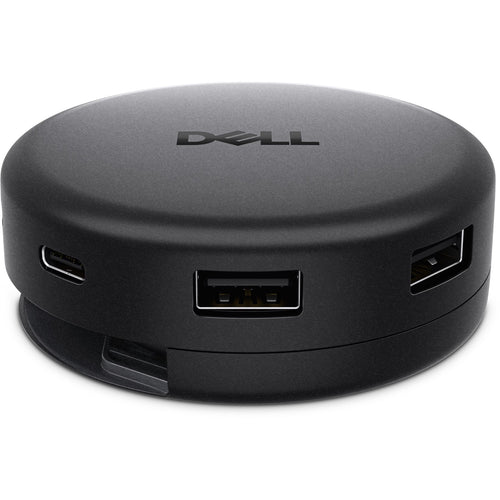
Easily connect or charge devices with a USB-C (up to 15W charging) and a USB Type-A connection.

Extensive connectivity
Connect all your accessories with ease using a wide variety of ports, including an RJ45 port for reliable Ethernet connectivity.

Seamless multitasking
Picture-by-Picture (PbP) lets you view content from multiple PCs on one screen. Use a single keyboard and mouse to work across these PCs. KVM and Auto KVM enable effortless switching between PC inputs.

Works with devices on macOS®*
Tested with devices on macOS, this USB-C monitor is ready-to-work with Mac® devices. Requires USB-C or HDMI connectivity. Daisy chaining** multiple displays via a single cable requires Thunderbolt connectivity. Please check your device for compatibility, as select M-series chips may not support some features. Install Dell Display and Peripheral Manager application to customise advance settings.
*Based on internal testing of select Dell monitors with USB-C or HDMI connection to devices on macOS, June 2024. Some features may not be supported.
**Daisy-chaining is supported on select Dell monitors. Please check device compatibility.
Enhanced eye comfort
TÜV 4-Star certified monitor for eye comfort reduces eye fatigue while you work.
Reduces blue light
This monitor features hardware low blue light technology, reducing harmful blue light emissions to ≤35% for enhanced eye comfort without sacrificing colour.

Refresh rate
100Hz refresh rate delivers less flicker, more seamless scrolling, and smoother motion.

Vivid colours
Wide colour coverage with up to 1.07b displayable colours and 99% sRGB ensures sharp and vivid visuals.

Work in clear detail
Colour consistency
Consistent, vibrant colours across wide viewing angles enabled by In-Plane Switching (IPS) technology.

Exceptional contrast
1500:1 contrast ratio for deeper blacks and brighter whites.

Designed for comfort
Adjustability to meet your preferences throughout the day.

Dell Display and Peripheral Manager
Experience Dell's singular, innovative application to optimise the performance of your entire Dell PC workspace*.
Maximise productivity
Easy Arrange tiles apps across screens with pre-set partitions and customises up to five windows, enhancing multitasking. Easy Arrange Memory saves and restores app profiles manually, on schedule, or at start-up.
Customise your views
Work comfortably, day or night. Automate your brightness and contrast settings to match your schedule.
More manageable
Save time and boost IT efficiency with the Dell Device Management Console to manage your Dell peripheral fleet at scale, from a single cloud-based console. Discover expanded Command Line Interface features from Dell Display and Peripheral Manager*.

*Based on Dell internal analysis, December 2024.
Ports and slots

2. 1 x HDMI port/s (HDCP 1.4) (Supports up to 3440 x 1440 as specified in HDMI 2.1 (TMDS))
3. 1 x DisplayPort 1.4 (HDCP 1.4) port/s
4. Stand lock
5. 1 x USB-C 5Gbps upstream port/s (DisplayPort 1.4 Alt Mode, Power Delivery up to 90 W)
6. 1 x USB Type-B 5Gbps upstream port/s
7. 2 x USB Type-A 5Gbps downstream port/s
8. RJ45 Ethernet port/s, 1GbE
9. 1 x USB-C 5Gbps downstream port/s, Power Delivery up to 15 W
10.1 x USB Type-A 5Gbps downstream port/s with Battery Charging 1.2
11.Built-in speakers
Specifications
Technical Specifications
| Number of Screens | 1 |
|---|---|
| Screen Size Class | 34" |
| Viewable Screen Size | 34.1" |
| Screen Mode | UW-QHD |
| Panel Technology | In-plane Switching (IPS) Technology |
| Response Time Details | 5 ms GTG (Fast)8 ms GTG |
| Aspect Ratio | 21:9 |
| Pixel Pitch | 0.23300 mm x 0.23300 mm |
| Horizontal Viewing Angle | 178° |
| Vertical Viewing Angle | 178° |
| Mount Type | Panel Mount |
| HDCP Supported | Yes |
| Maximum Adjustable Height | 150 mm |
| Tilt Angle | -5° to 21° |
| Swivel Angle | -30° to 30° |
| Slant Angle | -4°/4° |
| Features | Anti-glaresRGBEye Comfort TechnologyLow Blue LightFlicker-freeCable Lock SlotSecurity LockBFR FreePVC FreePicture by PicturePicture in Picture |
| Adjustable Stand | Yes |
| Stand Adjustments | SwivelHeightTiltSlant |
| Stand Included | Yes |
| Curved Screen | Yes |
| Curvature | 3800R |
| Glass Hardness | 3H |
| Camera Resolution | 4 Megapixel |
| Surface Treatment | Anti-glare |
| Flicker Free | Yes |
| Maximum Resolution | 3440 x 1440 at 100Hz |
| Standard Refresh Rate | 100 Hz |
| Colour Supported | 1.07 Billion Colours |
| Native Contrast Ratio | 1,500:1 |
| Brightness | 350 cd/m2 |
| Colour Gamut | 99% sRGB (CIE 1931) |
| Pixel Per Inch (PPI) | 109 |
| Resolution Type | Standard |
| Number of Speakers | 2 |
| Speakers | Yes |
| Speaker Output Power | 2 x 5 W |
| Connectivity | 1 HDMI port/s (HDCP 1.4) (Supports up to 3440 x 1440 as specified in HDMI 2.1 (TMDS))1 DisplayPort 1.4 (HDCP 1.4) port/s2 USB Type-A 5Gbps downstream port/s1 USB Type-B 5Gbps upstream port/s1 USB-C 5Gbps upstream port/s (DisplayPort 1.4 Alt Mode, Power Delivery up to 90 W)1 RJ45 Ethernet port/s, 1GbE1 USB Type-A 5Gbps downstream port/s with Battery Charging 1.21 USB-C 5Gbps downstream port/s, Power Delivery up to 15 W |
| USB Type-C (Power Delivery) Upstream | 90 W |
| USB Type-C (Power Delivery) Downstream | 15 W |
| Built-in Devices | USB HubKVM Switch |
| Webcam | Yes |
| Microphone | Yes |
| Operating Temperature Range | 0°C to 40°C |
| Non-operating Temperature Range | -20°C to 60°C |
| Operating Humidity Range | 10% to 80% (Non-condensing) |
| Non-operating Humidity Range | 5% to 90% (Non-condensing) |
| Maximum Operating Altitude | 5km |
| Maximum Non-operating Altitude | 12.19km |
| Input Voltage Range | 100V AC to 240V AC |
| Operating Power Consumption | 27 W |
| Standby Power Consumption | 0.5 W |
| Off-Mode Power Consumption | 0.3 W |
| Frequency | 50 Hz60 Hz |
| Maximum Power Consumption | 220 W |
| Voltage Current | 2.50 A |
| Input Voltage Range/Current Details | 100 VAC to 240 VAC/50 Hz or 60 Hz ± 3 Hz/2.5 A |
| VESA Mount Compatible | Yes |
| VESA Mount Standard | 100 x 100 |
| Colour Family | Black |
| Product Colour | Black |
| Height | 392.78 mm |
| Width | 815.57 mm |
| Depth | 85.86 mm |
| Bezel Width (Top) | 8.70 mm |
| Bezel Width (Bottom) | 17.13 mm |
| Bezel Width (Left) | 8.66 mm |
| Bezel Width (Right) | 8.66 mm |
| Weight (Approximate) | 7.18 kg |
| Stand Height | 433.30 mm |
| Stand Width | 343.20 mm |
| Stand Depth | 229.42 mm |
| Weight (with Packaging) with Stand | 14.81 kg |
| Weight (with Packaging) without Stand | 12.38 kg |
| Weight with Stand & Cables (Approximate) | 9.96 kg |
| Brand | Dell |
|---|---|
| Product Type | PC Peripherals > USB Hubs |
| Weight | 6.689 kg |
| Warranty |
|---|
Note:
Warranty period is as stated above unless the manufacturer has chosen to specify a longer period.
All warranties are return to base unless otherwise specified.
Shipping Information
- Free NZ-wide shipping on orders over $299
- Standard delivery 2–5 business days
- Rural delivery may take an additional 1–2 days
- Same-day dispatch for orders placed before 2pm (weekdays)
Returns Policy
- 7-day returns on unused items in original packaging
- Faulty or damaged products covered under warranty
- Contact our support team to initiate a return