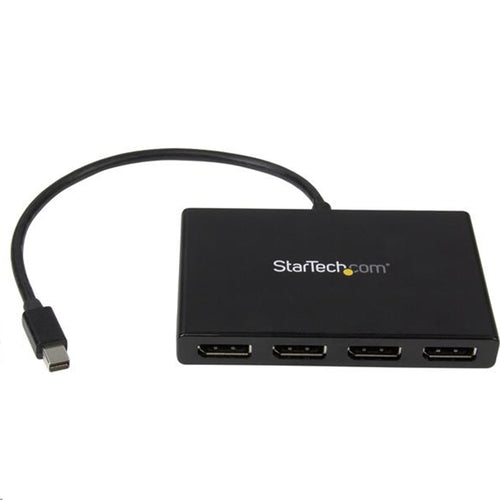
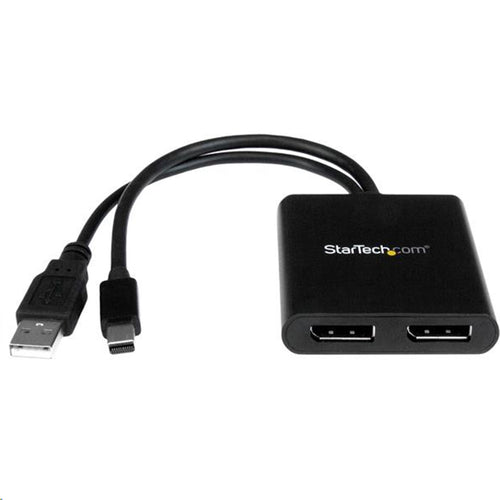
StarTech.com MSTDP122DP - MST hub - DisplayPort to 2x DisplayPort
Features
Use this adapter to connect two independent displays to a single DP 1.2 port
- MULTI-MONITOR CONFIGURATION: Dual-Monitor DisplayPort 1.2 MST Hub drives up to 2x 4K 30Hz (UHD) or 2x 1080p 60Hz DisplayPort monitors using a DP video port on a Windows desktop PC or laptop; Not compatible with macOS
- NO DRIVERS OR SOFTWARE: Increase productivity by adding two extended or mirrored displays to a Windows computer; Utilize integrated or discrete GPU (Intel/AMD/Nvidia) capabilities enabling high performance graphics with minimal CPU usage
- HARDWARE COMPATIBILITY: Host system must support DP 1.2 / HBR2 / MST; Please verify maximum number of displays supported by your GPU; Some GPU chips (such as Intel HD Graphics) are only capable of supporting a maximum of three displays
- EASY TO USE: Extend your desktop at your workstation in the office/home office; Built-In 9.8" (25cm) USB-A cable for power (USB bus-powered); Latching DisplayPort connector ensures a reliable connection and prevents accidental disconnection
This MST hub lets you connect two monitors to your DisplayPort™ (DP) 1.2 equipped Windows® laptop or desktop. It's USB powered, so the only thing you'll need to operate the hub is your computer.
Increase productivity with multiple screens
The newest generations of computers are more portable than ever, which often means that you're left with fewer video outputs and smaller integrated screens. This MST hub solves both of these problems by letting you connect two additional displays to your computer, which makes multitasking much easier.
Connect to any display
With the MST hub, you can use DisplayPort video adapters and cable adapters that enable you to connect HDMI, VGA or DVI displays. This ensures your MST hub will be compatible with virtually any television, monitor or projector. The hub is VESA and DisplayPort certified to support DP 1.2 enabled systems, for seamless integration with your existing video equipment.
Configure your displays for any environment
Using the MST hub, you can extend your desktop onto additional monitors and stream independent content to each display, giving you the freedom to multitask and increase your productivity. You can also mirror the same image onto multiple displays for remote viewing applications such as digital signage.
Enjoy amazing video quality, without draining system resources
MST technology uses your existing video card to minimize the use of system resources while delivering Ultra HD 4K resolutions. This unprecedented performance makes MST perfect for high-resolution applications such as graphic design, gaming and medical imaging.
Note: When using a DisplayPort 1.1 video card the MST hub will act as a splitter, automatically mirroring your video source across all displays. Resolution limitations apply.
The MSTDP122DP supports plug-and-play installation for a hassle-free setup, and is backed by a StarTech.com 3-year warranty and free lifetime technical support.
Average resolution bandwidth allocation
- 1920x1080 (High-definition 1080p) @60hz - 22%
- 1920x1200 @60hz - 30%
- 2560x1440 @60hz - 35%
- 2560x1600 @60hz - 38%
- 3840 x 2160 (Ultra HD 4K) @30hz - 38%
Note: Exceeding 100% will reduce functionality.
Applications
- Use one screen for reference data such as websites, while composing in another screen
- Dock your DP 1.2 device and add two high-resolution displays to your workstation
- Create a panoramic video wall for DisplayPort digital signage applications
- Edit images, video or audio clips across two additional displays in any orientation or resolution
- Perfect for spanning a spreadsheet or worksheet across two additional displays, to avoid side-scrolling
Specifications
Technical Specifications
| Console Interface(s) | 2 - USB 2.0 Type-A (4 pin, 480Mbps)2 - 3.5 mm Mini-Jack (3 Position)1 - HDMI (19 pin) |
|---|---|
| Host Connectors | 2 - 3.5 mm Mini-Jack (3 Position)1 - HDMI (19 pin)1 - USB 2.0 Type-A (4 pin, 480Mbps) |
| Operating Temperature | 0°C to 40°C (32°F to 104°F) |
| Storage Temperature | -20°C to 60°C (4°F to 140°F) |
| Humidity | 0~90% RH Non-Condensing |
| Audio | Yes |
| KVM Ports | 2 |
| PC Interface | USB |
| PC Video Type | HDMI |
| Number of Monitors Supported | 1 |
| Rack-Mountable | No |
| Cables Included | Yes |
| Industry Standards | HDCP |
| Daisy-Chain | No |
| LED Indicators | 1 - PC Selection indictor |
| Package Height | 2.6 in [6.5 cm] |
| Package Length | 9.9 in [25.1 cm] |
| Shipping (Package) Weight | 16.0 oz [452.0 g] |
| Package Width | 6.4 in [16.2 cm] |
| Package Quantity | 1 |
| On-Screen Display | No |
| IP Control | No |
| Hot-Key Selection | Yes |
| Audio Specifications | Port Selection SupportPush Button, Hotkeys, and Software |
| Weight of Product | 12.4 oz [350.0 g] |
| Color | Black |
| Material | Plastic |
| Cable Length | 33.5 in [850 mm] |
| Product Length | 3.5 in [8.8 cm] |
| Product Width | 2.6 in [6.6 cm] |
| Product Height | 0.9 in [2.3 cm] |
| Power Source | USB-Powered |
| OS Compatibility | Windows® 2000, XP, Vista, 7, 8, 8.1, 10Windows Server® 2003, 2008 R2, 2012, 2016, 2019, 2022Mac OS 10.6 to 10.12 |
| Note | OS Compatibility refers to KVM software only - the KVM itself can be used without software on any platform |
| Included in Package | 1 - KVM Switch1 - Software CD1 - Instruction Manual |
| Brand | StarTech.com |
|---|---|
| Product Type | TV & Home Theatre > AV Splitters & Switches |
| Weight | 0.93 kg |
| Warranty |
|---|
Note:
Warranty period is as stated above unless the manufacturer has chosen to specify a longer period.
All warranties are return to base unless otherwise specified.
Shipping Information
- Free NZ-wide shipping on orders over $299
- Standard delivery 2–5 business days
- Rural delivery may take an additional 1–2 days
- Same-day dispatch for orders placed before 2pm (weekdays)
Returns Policy
- 7-day returns on unused items in original packaging
- Faulty or damaged products covered under warranty
- Contact our support team to initiate a return