REXTRON MKAG-G3112 - 2 Ports True 4K HDMI KVM Switch w/ HDCP Engine USB 3.2 Audio Hotkey Control
Features
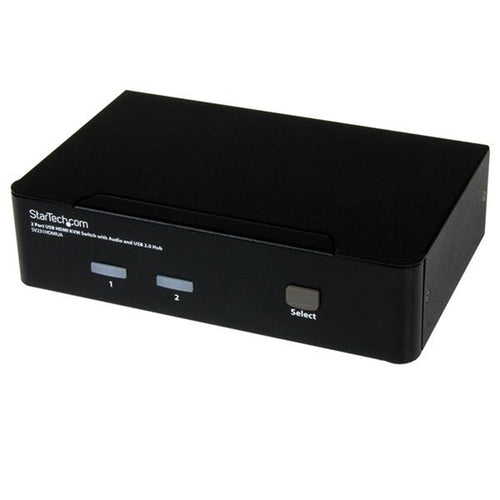
The MKAG-G3112 is a 2 Ports True 4K HDMI 2.0 KVM Switch with HDCP Engine built-in, and allows users to share one set of keyboard, mouse, monitor, and audio between two computers. This 2 Ports desktop KVM Switch supporting most popular resolutions up to 4K 60Hz (4:4:4) is ideal for multimedia applications.Besides, there is no need for software or interface card installation. Just connect the cables, power up the system and you are ready to have duplicated video images for multiple monitors with excellent clarity.
This True 4K 2 Ports HDMI 2.0 KVM Switch's EDID management function ensures the optimized picture output without compatibility issues. It also supports independent 3.5mm stereo analog audio, and it's USB 3.2 Gen 1 ports provide excellent I/O speed to meet most requirements. For your convenience, there is a buzzer sound effect for operation confirmation.
- Allows 2 Computers Share 1 Set of KVM Console
- HDMI 2.0 Video Supports Most Popular Resolutions Up to 4K 60Hz ( 4:4:4 )
- HDR10 Support for Best Visual Experience
- HDCP 2.2 / HDCP 1.4 Compliance Ensures
- Uninterrupted Video Playback
- HDCP Engine Ensures Low-Latency Switch
- HDCP Management Allows User to Select Proper HDCP Version
- EDID Management, Including EDID Copy / Auto EDID, Ensures Display Compatibility
- Plug-and-Play without Software or Driver
- Front and Rear USB Ports Allow Easy Access
- USB 3.2 Gen 1 Provides Excellent 5Gbps Speed
- Manual-Scan / Auto-Scan and Selectable Scan Interval
- Suitable Applications Includes Office, SOHO, Gaming, Industrial Control, ...Etc
2 Flexible Switching Control Methods:
- Front Push Buttons
- Hotkey Control

Special Design for HDCP Slide Switch
This 2 Ports HDMI 2.0 KVM Switch enables users to copy or learn EDIDs automatically from the connected monitors, and the built-in exclusive HDCP slide switch on the rear panel allows users to select the 3 preset HDCP modes:
Mode-1: Auto mode allows HDCP 2.2 or HDCP 1.4 content pass-thru (factory default)
Mode-2: HDCP 1.4 mode allows HDCP 1.4 content to be licensed
Mode-3: NONE mode allows non-HDCP content to be played
NOTE: The upgrade port (mini USB-B port) is designed for firmware update.

Connection

What is KVM Switch?
KVM stands for "Keyboard, Video, and Mouse". KVM allows you to access multiple computers or servers via only one set of Keyboard, Mouse and Monitor. Computers may be selected by pressing the KVM push button directly, by issuing hotkey commands or by activating OSD window. KVM switch is a compact size pure hardware solution plug-and-play system without any driver or software installation. It simply reduces redundant cables and encourages a neat and tidy working environment, saving you space, time, equipment, and money.
Where Do KVM Switches Use?
The KVM switches basically have 2 to 4 USB ports, allowing you to share keyboards, mice, printers, USB thumb drives, webcams, headsets, or other peripherals.
Rextron USB KVM Switch products are suitable to be used in SOHO, Server Rooms, Airports, Stations or the environment that needs to control multiple PCs at the same time.
Rextron 2 Ports True 4K HDMI 2.0 KVM Switch With USB 3.2 Gen 2, HDCP Engine, Audio and Hotkey Control is the first USB 3.2 Gen 2 KVM Switch in the world that can support higher-speed USB drive, USB storage, and higher resolution 4K 60Hz ( 4:4:4 ).
Specifications
Technical Specifications
| Model | MKAG-G3112 |
|---|---|
| Computer/Server Ports (Input) | HDMI x 2 ( Single Display x 2 PCs )USB 3.2 Gen 1 Type B x 2Audio Jack in x 2 |
| Console Ports (Output) | HDMI x 1 ( Single Display )USB 3.2 Gen 1 Type A x 2 (Rear & Front)USB HID Type A x 4 (Rear & Front)Audio Jack out x 1 |
| Video Resolution (Max.) | 4096x2160 @ 60Hz (4:4:4)3840x2160 @ 60Hz (4:4:4) |
| Push Buttons | Port Selection x 1Auto EDID & EDID Copy Function x 1 |
| HDCP Slide Switch | x 1 ( Auto / 1.4 / None ) |
| HDCP Compliance | HDCP 2.2 / 1.4 |
| Control Methods | Hotkey / Push Button |
| LED Indicator (Power / Status) | Computer Ready x 2 (Green)Computer Selected x 2 (Red)EDID Copy x 1 |
| EDID Management | Copy / Auto / Default |
| HDCP Engine | Yes ( On Each Video Input Port ) |
| Automatic Scan Interval | 3, 8, 15, 30 seconds |
| Power Supply | DC 9~12V |
| Operation Environment | 0~40°C, Humidity<80% |
| Storage Temperature | -20~60°C |
| Enclosure | Metal |
| Dimensions (H x W x D) | 44 x 160 x 100 mm |
| Weight | 640 g |
| Brand | REXTRON |
|---|---|
| Product Type | PC Peripherals > KVM Switches & Cables |
| Weight | 0.499 kg |
| Warranty |
|---|
Note:
Warranty period is as stated above unless the manufacturer has chosen to specify a longer period.
All warranties are return to base unless otherwise specified.
Shipping Information
- Free NZ-wide shipping on orders over $299
- Standard delivery 2–5 business days
- Rural delivery may take an additional 1–2 days
- Same-day dispatch for orders placed before 2pm (weekdays)
Returns Policy
- 7-day returns on unused items in original packaging
- Faulty or damaged products covered under warranty
- Contact our support team to initiate a return