Huion HS610 On-The-Go Pen Tablet
Features
- OS Android 6.0 Supported - Not Only compatible with Windows or Mac OS, it also supports Android devices; You can easily connect your phone to the tablet with the OTG connector; ONLY mobile phone and tablet powered by Android 6.0 or above are supported, while iPhone and iPad are NOT at the moment. NOTE: The cursor will not show up in SAMSUNG at present, except SAMSUNG Note Series. If you are not sure whether the product is compatible with your Phone or if you meet any problems, please contact us.
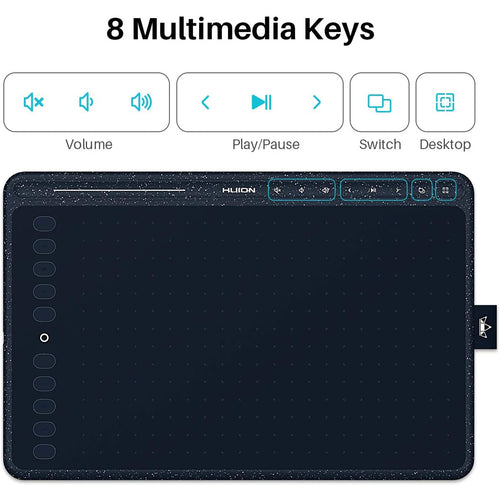
- Touch Ring - The newly-design Touch Ring helps you zoom in or out for your canvas, adjust your brush and page scrolling; Use the 12 Press Keys to customize the function as you like.
- Tilt Function - HS610 supports ±60 degrees brush tilt; Provide you better pressure detection and accurate cursor positioning with different angles, restore the true feeling of painting.
- Battery-free Stylus - Say goodbye to the pen charging cable; It provides a more accurate and natural drawing experience.
- 8192 Pen Pressure - You can enjoy smooth and accurate lines when using the drawing tablet; 266PPS Report Rate and 5080LPI Pen Resolution; Compatible with Photoshop, SAI or mainstream digital art software; One year warranty.
A graphics tablet can be connected to your phone/ tablet
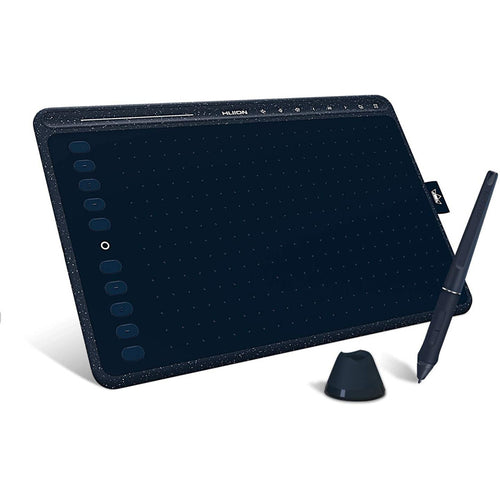
The HS610 graphic tablet is a brand new product that can be connected not only to a PC/laptop but also to an Android phone/tablet to use. Coupled with a weight of 600g and a thickness of 8mm, this device is very lightweight and easy to carry, so you can pack this device into your bag and carry around conveniently.
Excellent pen performance
HS610 is equipped with the PW100 battery-free pen, which sets you free from the charging issues. Together with 8192 levels of pen pressure sensitivity and ±60° tilt support, you can enjoy more accurate and natural strokes, bringing you a more real paper-like drawing experience.
Customize the express keys as you like
Free to set up the 12 hard express keys and 16 soft express keys according to your habits. Together with 1 touch ring, this combination helps a lot to improve your working efficiency and save your time.
Work area
Because the work area of a PC/laptop is different from a phone/tablet, so the work area of the HS610 graphic tablet will be different according to the different connection way you choose. For a PC/laptop connection, the work area for the graphic tablet is 254 x 158.8mm. For an Android phone/tablet connection, the work area will be 158.8 x 99.2mm.
266PPS+5080 LPI
266PPS helps to sense the pen movement agilely, with almost no delay lines. 5080 LPI high pen resolution makes the pen stroke more delicate and natural, which can easily achieve pixel-level painting display. Thanks to these configurations, your working flow is greatly improved.
OS Compatibility
It is compatible with Windows 7 or later, macOS 10.12 or later, and Android 6.0 or later.
And if you are connecting the tablet with Android device, you can try ibis Paint and other mainstream drawing apps.
What's in the box?
- Pen Tablet
- Battery-free Pen
- Micro USB Cable
- Pen Holder PH03
- Pen Nibs x 8 (Inside the pen holder)
- OTG Adapter (Micro USB)
- OTG Adapter (USB-C)
- Quick Start Guide
WARM TIPS:
1. HS610 is not a stand alone product!
HS610 must be connected to a computer or Android Devices to use.
2. Connection
Please make sure completely plug USB cable into the tablet. When you need to connect the tablet to mobile phone, please use the OTG adapter and operate following to the user manual.
3. Driver Download and Installation
Driver Download: Our driver will be regularly updated, so please go to Huion official web to download the newest driver, and install it on your computer.
3.1 For Windows Users:
Please make sure there is no other brands driver on computer and close all drawing program or anti-virus program before installation. (IMPORTANT) Please run as administrator when installing the driver.
3.2 For Mac Mojave (10.14), Catalina (10.15) Users:
Our driver is compatible with Mac OS Mojave (10.14) and Catalina (10.15), please install the newest released driver on your computer and add the "HuionTablet" and "TabletDriverAgent" into the whitelist first after installed the driver.
4. HUION Tech Support
If you have any problems with the HS610, please check the Quick Guide and search Huion online to find a way to ask us for further assistance, we are always ready to help you!
Reminder:
The Samsung Note series can display the cursor after setting, other series will not. The cursor will not show up in following models:
Nexus 6 /Google
Galaxy S6 /Samsung
Galaxy S7 edge /Samsung
Galaxy S7 /Samsung
Galaxy Tab S2 /Samsung
Galaxy S8 /Samsung
Galaxy S9 /Samsung
Galaxy S10, S10e /Samsung
Specifications
Technical Specifications
| Response Time | No |
|---|---|
| Number of Colors | No |
| gamut | No |
| Contrast Ratio (Typical) | No |
| Technology | Battery-Free Electromagnetic Resonance |
| Active Area | PC mode: 254 x 158.8mm (10 x 6.25in); Phone mode: 158.8 x 99.2mm |
| Resolution | 5080 LPI |
| Report Rate | 266PPS |
| Pen Pressure | 8192Levels |
| Reading Height | 10mm |
| Supply Voltage | No |
| Power Consumption | No |
| Interface Support | Micro USB |
| OS Support | Windows 7 or later, macOS 10.12 or later Android 6.0 or later |
| Compliance | CE/FCC/CCC |
| Dimensions/piece | 350 x 211.8 x 8mm |
| Net Weight/ piece | 600g |
| Gross Weight/piece | 1.3KG |
| Out Carton Dimensions | 410*220*40MM |
| Quantity per Carton | 10 |
| Net Weight/carton | 10.29KG |
| USB Cable Length | No |
| Gross Weight/carton | 13.85KG |
| Type | Graphics tablet |
| Express Keys | 12 Customized Press Keys |
| Function Keys | 16 Customized Soft Keys |
| Brand | Huion |
|---|---|
| Product Type | PC Peripherals > Graphics Tablets |
| Weight | 1.214 kg |
| Warranty |
|---|
Note:
Warranty period is as stated above unless the manufacturer has chosen to specify a longer period.
All warranties are return to base unless otherwise specified.
Shipping Information
- Free NZ-wide shipping on orders over $299
- Standard delivery 2–5 business days
- Rural delivery may take an additional 1–2 days
- Same-day dispatch for orders placed before 2pm (weekdays)
Returns Policy
- 7-day returns on unused items in original packaging
- Faulty or damaged products covered under warranty
- Contact our support team to initiate a return